
(2026年10月29日 追記:記事どおりに再現できるよう、必要なコードと手順を追加しました)
見積書を作る前に、まず「誰に」「何を」売るのかを登録しておく土台が要ります。この第1回では、Ruby on Rails 8の scaffold を使って、取引先マスタと品目マスタの登録・一覧画面を作り、入力チェックと日本語化まで仕上げます。前回の第0回(Rails 8の雛形を動かして、Excel見積からの脱却を始める)で作った雛形の続きです。

「Excelの取引先一覧と品目一覧を、そのままシステムに移したい。でも入力ミスや重複が心配…」
結論から言うと、マスタ管理は「scaffoldで骨組みを作り、入力チェックを足して、日本語にする」の3手順で、1日かからず形になります。 本当に大事なのは画面の数ではなく、「品目コードの重複禁止」「消費税率は8%と10%だけ」といったルールをデータの入口で固定しておくことです。この回では、そのルールをテストコードで守る方法まで書きます。
取引先・品目マスタで作るもの
作るのは次の2つです。どちらも「一覧・検索・登録・編集・削除」ができます。
| マスタ | 主な項目 | 入力チェック(この回で入れるもの) |
|---|---|---|
| 取引先 | 取引先名・カナ・郵便番号・住所・メール・電話・備考 | 取引先名は必須/郵便番号は7桁/メールの形式 |
| 品目 | 品目コード・品目名・単位・単価(税抜)・税率・使用中 | コードは重複禁止/単価は0以上の整数/税率は8か10 |
マスタは後の回で見積書の明細から参照されます。そのため、最初に項目の型とルールを決めておくと、後から作り直す手間が減ります。
scaffoldで骨組みを一気に作る
scaffold(足場)は、データの保存先(モデル・テーブル)・画面・処理の入口(コントローラー)・URLの設定を、1コマンドでまとめて生成するRailsの機能です。入力フォームから一覧までの基本形が数秒でできます。
📰 出典:Ruby on Rails Guides「Getting Started with Rails」
bin/rails generate scaffold Customer name:string name_kana:string postal_code:string \
  address:string email:string phone:string note:text --no-test-framework
bin/rails generate scaffold Item code:string name:string unit:string \
  unit_price:integer tax_rate:integer active:boolean --no-test-framework
--no-test-framework は自動生成のテストを作らない指定です。この連載では、ルールに合わせたテストを自分で書きます。生成された画面は英語表記で、入力チェックも付いていません。ここからが「磨き込み」です。
マイグレーションのファイル名の数字は、コマンドを実行した日時になります(この記事では 20261002064432_create_customers.rb と 20261002064437_create_items.rb)。この連載は画面(HTML)だけを使うため、scaffold が作ったJSON用のファイルと、一覧・詳細で使う部品(_customer.html.erb・_item.html.erb)は消します。
rm app/views/customers/*.jbuilder app/views/items/*.jbuilder
rm app/views/customers/_customer.html.erb app/views/items/_item.html.erb
scaffold はルートをファイルの先頭に足すので、トップページの後ろに並べ替えておきます(動きは変わりません)。config/routes.rb に次の変更を加えます(+ が追加、- が削除)。
--- a/config/routes.rb
+++ b/config/routes.rb
@@ -1,6 +1,4 @@
 Rails.application.routes.draw do
-  resources :items
-  resources :customers
   # Define your application routes per the DSL in https://guides.rubyonrails.org/routing.html

   # Reveal health status on /up that returns 200 if the app boots with no exceptions, otherwise 500.
@@ -13,4 +11,7 @@ Rails.application.routes.draw do

   # Defines the root path route ("/")
   root "home#index"
+
+  resources :customers
+  resources :items
 end
テーブル定義でも「守り」を入れる
生成されたマイグレーション(テーブル定義の変更履歴)を、実務向けに直します。ポイントは、アプリ側の入力チェックだけに頼らず、データベース自体にも制約を入れることです。
db/migrate/20261002064432_create_customers.rb に次の変更を加えます(+ が追加、- が削除)。
--- a/db/migrate/20261002064432_create_customers.rb
+++ b/db/migrate/20261002064432_create_customers.rb
@@ -1,7 +1,7 @@
 class CreateCustomers < ActiveRecord::Migration[8.1]
   def change
     create_table :customers do |t|
-      t.string :name
+      t.string :name, null: false
       t.string :name_kana
       t.string :postal_code
       t.string :address
@@ -11,5 +11,6 @@ class CreateCustomers < ActiveRecord::Migration[8.1]

       t.timestamps
     end
+    add_index :customers, :name
   end
 end
db/migrate/20261002064437_create_items.rb に次の変更を加えます(+ が追加、- が削除)。
--- a/db/migrate/20261002064437_create_items.rb
+++ b/db/migrate/20261002064437_create_items.rb
@@ -1,14 +1,15 @@
 class CreateItems < ActiveRecord::Migration[8.1]
   def change
     create_table :items do |t|
-      t.string :code
-      t.string :name
+      t.string :code, null: false
+      t.string :name, null: false
       t.string :unit
-      t.integer :unit_price
-      t.integer :tax_rate
-      t.boolean :active
+      t.integer :unit_price, null: false, default: 0
+      t.integer :tax_rate, null: false, default: 10
+      t.boolean :active, null: false, default: true

       t.timestamps
     end
+    add_index :items, :code, unique: true
   end
 end
null: false:空のまま保存できない(必須項目)default:入力しなかったときの初期値(税率は標準の10%)unique: true:同じ品目コードを2つ登録できない
単価を integer(整数)にしているのは、円単位の金額を小数で持つと端数の誤差が出るためです。金額計算の詳細は第4回で扱います。
モデルに入力チェック(バリデーション)を書く
Railsでは、入力チェックのことをバリデーションと呼び、モデルに宣言的に書きます。
📰 出典:Ruby on Rails Guides「Active Record Validations」
生成された app/models/item.rb に次の変更を加えます(+ が追加、- が削除)。
--- a/app/models/item.rb
+++ b/app/models/item.rb
@@ -1,2 +1,17 @@
 class Item < ApplicationRecord
+  # 消費税率(%)。軽減税率の8%と標準の10%だけを許す
+  TAX_RATES = [ 8, 10 ].freeze
+
+  validates :code, presence: true, uniqueness: true, length: { maximum: 30 }
+  validates :name, presence: true, length: { maximum: 100 }
+  validates :unit_price, numericality: { only_integer: true, greater_than_or_equal_to: 0 }
+  validates :tax_rate, inclusion: { in: TAX_RATES }
+
+  scope :active, -> { where(active: true) }
+  scope :search, ->(keyword) {
+    next all if keyword.blank?
+
+    pattern = "%#{sanitize_sql_like(keyword.strip)}%"
+    where("code ILIKE :p OR name ILIKE :p", p: pattern)
+  }
 end
消費税率を8と10に限定した根拠は、国税庁が示す現行の税率(標準10%・軽減8%)です。
📰 出典:国税庁「消費税の軽減税率制度について」
税率は法改正で変わりうるため、本番運用では「税率を設定として管理する」設計も検討します。この連載では、わかりやすさを優先して定数にしています(執筆時点:2026年10月)。
取引先のモデル app/models/customer.rb も同様に、次の変更を加えます(+ が追加、- が削除)。
--- a/app/models/customer.rb
+++ b/app/models/customer.rb
@@ -1,2 +1,12 @@
 class Customer < ApplicationRecord
+  validates :name, presence: true, length: { maximum: 100 }
+  validates :postal_code, format: { with: /\A\d{3}-?\d{4}\z/ }, allow_blank: true
+  validates :email, format: { with: URI::MailTo::EMAIL_REGEXP }, allow_blank: true
+
+  scope :search, ->(keyword) {
+    next all if keyword.blank?
+
+    pattern = "%#{sanitize_sql_like(keyword.strip)}%"
+    where("name ILIKE :p OR name_kana ILIKE :p", p: pattern)
+  }
 end
検索の sanitize_sql_like は、検索語に含まれる % や _ をただの文字として扱うための処理です。これがないと「%」と入力しただけで全件が出てしまいます。PostgreSQLの ILIKE は、大文字小文字を区別しない部分一致です。
エラーメッセージと項目名を日本語にする
Railsの初期設定は英語です。config/application.rb の config.i18n.default_locale = :ja を指定済みなので、日本語の辞書ファイルを置きます。
📰 出典:Ruby on Rails Guides「Rails Internationalization (I18n) API」
日本語の辞書ファイル config/locales/ja.yml を新しく作ります。
# config/locales/ja.yml
ja:
  activerecord:
    models:
      customer: 取引先
      item: 品目
    attributes:
      customer:
        name: 取引先名
        name_kana: 取引先名(カナ)
        postal_code: 郵便番号
        address: 住所
        email: メールアドレス
        phone: 電話番号
        note: 備考
      item:
        code: 品目コード
        name: 品目名
        unit: 単位
        unit_price: 単価(税抜)
        tax_rate: 消費税率
        active: 使用中
  errors:
    format: "%{attribute}%{message}"
    messages:
      blank: を入力してください
      taken: はすでに使われています
      invalid: の形式が正しくありません
      inclusion: は選べない値です
      not_a_number: は数字で入力してください
      not_an_integer: は整数で入力してください
      greater_than_or_equal_to: は%{count}以上にしてください
too_long: は%{count}文字以内にしてくださいこれで「品目コードはすでに使われています」のような、現場の人に伝わるエラーが画面に出ます。画面側は、エラーを共通部品(パーシャル)にまとめて、取引先・品目の両方で使い回します。app/views/shared/_errors.html.erb を新しく作ります。
<%# app/views/shared/_errors.html.erb %>
<% if record.errors.any? %>
  <div class="errors" role="alert">
    <p>入力内容を確認してください(<%= record.errors.count %>件)</p>
    <ul>
      <% record.errors.each do |error| %>
        <li><%= error.full_message %></li>
      <% end %>
    </ul>
  </div>
<% end %>
コントローラーを整える
scaffoldが作るコントローラーはJSON出力にも対応した長いものです。この連載は画面だけを使うため、HTMLのみに絞って短くし、一覧に検索を付けます。生成された app/controllers/items_controller.rb に次の変更を加えます(+ が追加、- が削除)。
app/controllers/items_controller.rb の差分(82行)
--- a/app/controllers/items_controller.rb
+++ b/app/controllers/items_controller.rb
@@ -1,69 +1,48 @@
 class ItemsController < ApplicationController
   before_action :set_item, only: %i[ show edit update destroy ]

-  # GET /items or /items.json
   def index
-    @items = Item.all
+    @items = Item.search(params[:q]).order(:code, :id)
   end

-  # GET /items/1 or /items/1.json
   def show
   end

-  # GET /items/new
   def new
     @item = Item.new
   end

-  # GET /items/1/edit
   def edit
   end

-  # POST /items or /items.json
   def create
     @item = Item.new(item_params)

-    respond_to do |format|
-      if @item.save
-        format.html { redirect_to @item, notice: "Item was successfully created." }
-        format.json { render :show, status: :created, location: @item }
-      else
-        format.html { render :new, status: :unprocessable_content }
-        format.json { render json: @item.errors, status: :unprocessable_content }
-      end
+    if @item.save
+      redirect_to @item, notice: "#{Item.model_name.human}を登録しました。"
+    else
+      render :new, status: :unprocessable_content
     end
   end

-  # PATCH/PUT /items/1 or /items/1.json
   def update
-    respond_to do |format|
-      if @item.update(item_params)
-        format.html { redirect_to @item, notice: "Item was successfully updated.", status: :see_other }
-        format.json { render :show, status: :ok, location: @item }
-      else
-        format.html { render :edit, status: :unprocessable_content }
-        format.json { render json: @item.errors, status: :unprocessable_content }
-      end
+    if @item.update(item_params)
+      redirect_to @item, notice: "#{Item.model_name.human}を更新しました。", status: :see_other
+    else
+      render :edit, status: :unprocessable_content
     end
   end

-  # DELETE /items/1 or /items/1.json
   def destroy
     @item.destroy!
-
-    respond_to do |format|
-      format.html { redirect_to items_path, notice: "Item was successfully destroyed.", status: :see_other }
-      format.json { head :no_content }
-    end
+    redirect_to items_path, notice: "#{Item.model_name.human}を削除しました。", status: :see_other
   end

   private
-    # Use callbacks to share common setup or constraints between actions.
     def set_item
       @item = Item.find(params.expect(:id))
     end

-    # Only allow a list of trusted parameters through.
     def item_params
       params.expect(item: [ :code, :name, :unit, :unit_price, :tax_rate, :active ])
     end
app/controllers/customers_controller.rb も同じ形に直します(+ が追加、- が削除)。
app/controllers/customers_controller.rb の差分(82行)
--- a/app/controllers/customers_controller.rb
+++ b/app/controllers/customers_controller.rb
@@ -1,69 +1,48 @@
 class CustomersController < ApplicationController
   before_action :set_customer, only: %i[ show edit update destroy ]

-  # GET /customers or /customers.json
   def index
-    @customers = Customer.all
+    @customers = Customer.search(params[:q]).order(:name_kana, :id)
   end

-  # GET /customers/1 or /customers/1.json
   def show
   end

-  # GET /customers/new
   def new
     @customer = Customer.new
   end

-  # GET /customers/1/edit
   def edit
   end

-  # POST /customers or /customers.json
   def create
     @customer = Customer.new(customer_params)

-    respond_to do |format|
-      if @customer.save
-        format.html { redirect_to @customer, notice: "Customer was successfully created." }
-        format.json { render :show, status: :created, location: @customer }
-      else
-        format.html { render :new, status: :unprocessable_content }
-        format.json { render json: @customer.errors, status: :unprocessable_content }
-      end
+    if @customer.save
+      redirect_to @customer, notice: "#{Customer.model_name.human}を登録しました。"
+    else
+      render :new, status: :unprocessable_content
     end
   end

-  # PATCH/PUT /customers/1 or /customers/1.json
   def update
-    respond_to do |format|
-      if @customer.update(customer_params)
-        format.html { redirect_to @customer, notice: "Customer was successfully updated.", status: :see_other }
-        format.json { render :show, status: :ok, location: @customer }
-      else
-        format.html { render :edit, status: :unprocessable_content }
-        format.json { render json: @customer.errors, status: :unprocessable_content }
-      end
+    if @customer.update(customer_params)
+      redirect_to @customer, notice: "#{Customer.model_name.human}を更新しました。", status: :see_other
+    else
+      render :edit, status: :unprocessable_content
     end
   end

-  # DELETE /customers/1 or /customers/1.json
   def destroy
     @customer.destroy!
-
-    respond_to do |format|
-      format.html { redirect_to customers_path, notice: "Customer was successfully destroyed.", status: :see_other }
-      format.json { head :no_content }
-    end
+    redirect_to customers_path, notice: "#{Customer.model_name.human}を削除しました。", status: :see_other
   end

   private
-    # Use callbacks to share common setup or constraints between actions.
     def set_customer
       @customer = Customer.find(params.expect(:id))
     end

-    # Only allow a list of trusted parameters through.
     def customer_params
       params.expect(customer: [ :name, :name_kana, :postal_code, :address, :email, :phone, :note ])
     end
params.expect は、受け取る項目を明示的に絞る仕組みです。ここに書いていない項目は無視されるため、画面に無い項目をこっそり書き換えられる攻撃(マスアサインメント)を防げます。
画面を日本語の業務画面にする
scaffold が作った画面は英語表記です。一覧に検索欄を付け、項目名を日本語にして、入力エラーを先ほどの共通部品で出すように直します。まず品目、次に取引先の画面です。
app/views/items/index.html.erb に次の変更を加えます(+ が追加、- が削除)。
app/views/items/index.html.erb の差分(43行)
--- a/app/views/items/index.html.erb
+++ b/app/views/items/index.html.erb
@@ -1,16 +1,27 @@
-<p style="color: green"><%= notice %></p>
+<% content_for :title, "品目一覧" %>

-<% content_for :title, "Items" %>
+<h1>品目</h1>

-<h1>Items</h1>
+<%= form_with url: items_path, method: :get, class: "actions" do |form| %>
+  <%= form.search_field :q, value: params[:q], placeholder: "品目コード・品目名で検索" %>
+  <%= form.submit "検索", name: nil %>
+  <%= link_to "新規登録", new_item_path %>
+<% end %>

-<div id="items">
-  <% @items.each do |item| %>
-    <%= render item %>
-    <p>
-      <%= link_to "Show this item", item %>
-    </p>
-  <% end %>
-</div>
-
-<%= link_to "New item", new_item_path %>
+<table>
+  <thead>
+    <tr><th>品目コード</th><th>品目名</th><th class="num">単価(税抜)</th><th class="num">税率</th><th>状態</th></tr>
+  </thead>
+  <tbody>
+    <% @items.each do |item| %>
+      <tr>
+        <td><%= item.code %></td>
+        <td><%= link_to item.name, item %></td>
+        <td class="num"><%= number_with_delimiter(item.unit_price) %>円<%= "/#{item.unit}" if item.unit.present? %></td>
+        <td class="num"><%= item.tax_rate %>%</td>
+        <td><%= item.active? ? "使用中" : "停止" %></td>
+      </tr>
+    <% end %>
+  </tbody>
+</table>
+<% if @items.empty? %><p class="muted">該当する品目はありません。</p><% end %>
app/views/items/show.html.erb に次の変更を加えます(+ が追加、- が削除)。
--- a/app/views/items/show.html.erb
+++ b/app/views/items/show.html.erb
@@ -1,10 +1,16 @@
-<p style="color: green"><%= notice %></p>
+<% content_for :title, @item.name %>
+<h1><%= @item.name %></h1>

-<%= render @item %>
+<dl>
+  <dt><%= Item.human_attribute_name(:code) %></dt><dd><%= @item.code %></dd>
+  <dt><%= Item.human_attribute_name(:unit) %></dt><dd><%= @item.unit.presence || "—" %></dd>
+  <dt><%= Item.human_attribute_name(:unit_price) %></dt><dd><%= number_with_delimiter(@item.unit_price) %>円</dd>
+  <dt><%= Item.human_attribute_name(:tax_rate) %></dt><dd><%= @item.tax_rate %>%</dd>
+  <dt><%= Item.human_attribute_name(:active) %></dt><dd><%= @item.active? ? "使用中" : "停止" %></dd>
+</dl>

-<div>
-  <%= link_to "Edit this item", edit_item_path(@item) %> |
-  <%= link_to "Back to items", items_path %>
-
-  <%= button_to "Destroy this item", @item, method: :delete %>
+<div class="actions">
+  <%= link_to "編集", edit_item_path(@item) %>
+  <%= link_to "一覧へ戻る", items_path %>
+  <%= button_to "削除", @item, method: :delete, form: { data: { turbo_confirm: "この品目を削除しますか?" } } %>
 </div>
app/views/items/_form.html.erb に次の変更を加えます(+ が追加、- が削除)。
app/views/items/_form.html.erb の差分(72行)
--- a/app/views/items/_form.html.erb
+++ b/app/views/items/_form.html.erb
@@ -1,47 +1,33 @@
 <%= form_with(model: item) do |form| %>
-  <% if item.errors.any? %>
-    <div style="color: red">
-      <h2><%= pluralize(item.errors.count, "error") %> prohibited this item from being saved:</h2>
+  <%= render "shared/errors", record: item %>

-      <ul>
-        <% item.errors.each do |error| %>
-          <li><%= error.full_message %></li>
-        <% end %>
-      </ul>
-    </div>
-  <% end %>
-
-  <div>
-    <%= form.label :code, style: "display: block" %>
-    <%= form.text_field :code %>
+  <div class="field">
+    <%= form.label :code %>
+    <%= form.text_field :code, required: true %>
   </div>
-
-  <div>
-    <%= form.label :name, style: "display: block" %>
-    <%= form.text_field :name %>
+  <div class="field">
+    <%= form.label :name %>
+    <%= form.text_field :name, required: true %>
   </div>
-
-  <div>
-    <%= form.label :unit, style: "display: block" %>
-    <%= form.text_field :unit %>
+  <div class="field">
+    <%= form.label :unit %>
+    <%= form.text_field :unit, placeholder: "式・個・時間 など" %>
   </div>
-
-  <div>
-    <%= form.label :unit_price, style: "display: block" %>
-    <%= form.number_field :unit_price %>
+  <div class="field">
+    <%= form.label :unit_price %>
+    <%= form.number_field :unit_price, min: 0, step: 1 %>
   </div>
-
-  <div>
-    <%= form.label :tax_rate, style: "display: block" %>
-    <%= form.number_field :tax_rate %>
+  <div class="field">
+    <%= form.label :tax_rate %>
+    <%= form.select :tax_rate, Item::TAX_RATES.map { |r| [ "#{r}%", r ] } %>
   </div>
-
-  <div>
-    <%= form.label :active, style: "display: block" %>
-    <%= form.checkbox :active %>
+  <div class="field">
+    <%= form.check_box :active %>
+    <%= form.label :active, style: "display: inline" %>
   </div>

-  <div>
-    <%= form.submit %>
+  <div class="actions">
+    <%= form.submit "保存する" %>
+    <%= link_to "一覧へ戻る", items_path %>
   </div>
 <% end %>
app/views/items/new.html.erb に次の変更を加えます(+ が追加、- が削除)。
--- a/app/views/items/new.html.erb
+++ b/app/views/items/new.html.erb
@@ -1,11 +1,3 @@
-<% content_for :title, "New item" %>
-
-<h1>New item</h1>
-
+<% content_for :title, "品目の登録" %>
+<h1>品目の登録</h1>
 <%= render "form", item: @item %>
-
-<br>
-
-<div>
-  <%= link_to "Back to items", items_path %>
-</div>
app/views/items/edit.html.erb に次の変更を加えます(+ が追加、- が削除)。
--- a/app/views/items/edit.html.erb
+++ b/app/views/items/edit.html.erb
@@ -1,12 +1,3 @@
-<% content_for :title, "Editing item" %>
-
-<h1>Editing item</h1>
-
+<% content_for :title, "品目の編集" %>
+<h1>品目の編集</h1>
 <%= render "form", item: @item %>
-
-<br>
-
-<div>
-  <%= link_to "Show this item", @item %> |
-  <%= link_to "Back to items", items_path %>
-</div>
app/views/customers/index.html.erb に次の変更を加えます(+ が追加、- が削除)。
app/views/customers/index.html.erb の差分(41行)
--- a/app/views/customers/index.html.erb
+++ b/app/views/customers/index.html.erb
@@ -1,16 +1,25 @@
-<p style="color: green"><%= notice %></p>
+<% content_for :title, "取引先一覧" %>

-<% content_for :title, "Customers" %>
+<h1>取引先</h1>

-<h1>Customers</h1>
+<%= form_with url: customers_path, method: :get, class: "actions" do |form| %>
+  <%= form.search_field :q, value: params[:q], placeholder: "取引先名・カナで検索" %>
+  <%= form.submit "検索", name: nil %>
+  <%= link_to "新規登録", new_customer_path %>
+<% end %>

-<div id="customers">
-  <% @customers.each do |customer| %>
-    <%= render customer %>
-    <p>
-      <%= link_to "Show this customer", customer %>
-    </p>
-  <% end %>
-</div>
-
-<%= link_to "New customer", new_customer_path %>
+<table>
+  <thead>
+    <tr><th>取引先名</th><th>電話番号</th><th>メールアドレス</th></tr>
+  </thead>
+  <tbody>
+    <% @customers.each do |customer| %>
+      <tr>
+        <td><%= link_to customer.name, customer %></td>
+        <td><%= customer.phone %></td>
+        <td><%= customer.email %></td>
+      </tr>
+    <% end %>
+  </tbody>
+</table>
+<% if @customers.empty? %><p class="muted">該当する取引先はありません。</p><% end %>
app/views/customers/show.html.erb に次の変更を加えます(+ が追加、- が削除)。
--- a/app/views/customers/show.html.erb
+++ b/app/views/customers/show.html.erb
@@ -1,10 +1,15 @@
-<p style="color: green"><%= notice %></p>
+<% content_for :title, @customer.name %>
+<h1><%= @customer.name %></h1>

-<%= render @customer %>
+<dl>
+  <% %i[name_kana postal_code address email phone note].each do |attr| %>
+    <dt><%= Customer.human_attribute_name(attr) %></dt>
+    <dd><%= @customer.public_send(attr).presence || "—" %></dd>
+  <% end %>
+</dl>

-<div>
-  <%= link_to "Edit this customer", edit_customer_path(@customer) %> |
-  <%= link_to "Back to customers", customers_path %>
-
-  <%= button_to "Destroy this customer", @customer, method: :delete %>
+<div class="actions">
+  <%= link_to "編集", edit_customer_path(@customer) %>
+  <%= link_to "一覧へ戻る", customers_path %>
+  <%= button_to "削除", @customer, method: :delete, form: { data: { turbo_confirm: "この取引先を削除しますか?" } } %>
 </div>
app/views/customers/_form.html.erb に次の変更を加えます(+ が追加、- が削除)。
app/views/customers/_form.html.erb の差分(78行)
--- a/app/views/customers/_form.html.erb
+++ b/app/views/customers/_form.html.erb
@@ -1,52 +1,37 @@
 <%= form_with(model: customer) do |form| %>
-  <% if customer.errors.any? %>
-    <div style="color: red">
-      <h2><%= pluralize(customer.errors.count, "error") %> prohibited this customer from being saved:</h2>
+  <%= render "shared/errors", record: customer %>

-      <ul>
-        <% customer.errors.each do |error| %>
-          <li><%= error.full_message %></li>
-        <% end %>
-      </ul>
-    </div>
-  <% end %>
-
-  <div>
-    <%= form.label :name, style: "display: block" %>
-    <%= form.text_field :name %>
+  <div class="field">
+    <%= form.label :name %>
+    <%= form.text_field :name, required: true %>
   </div>
-
-  <div>
-    <%= form.label :name_kana, style: "display: block" %>
+  <div class="field">
+    <%= form.label :name_kana %>
     <%= form.text_field :name_kana %>
   </div>
-
-  <div>
-    <%= form.label :postal_code, style: "display: block" %>
-    <%= form.text_field :postal_code %>
+  <div class="field">
+    <%= form.label :postal_code %>
+    <%= form.text_field :postal_code, placeholder: "123-4567" %>
   </div>
-
-  <div>
-    <%= form.label :address, style: "display: block" %>
+  <div class="field">
+    <%= form.label :address %>
     <%= form.text_field :address %>
   </div>
-
-  <div>
-    <%= form.label :email, style: "display: block" %>
-    <%= form.text_field :email %>
+  <div class="field">
+    <%= form.label :email %>
+    <%= form.email_field :email %>
   </div>
-
-  <div>
-    <%= form.label :phone, style: "display: block" %>
-    <%= form.text_field :phone %>
+  <div class="field">
+    <%= form.label :phone %>
+    <%= form.telephone_field :phone %>
   </div>
-
-  <div>
-    <%= form.label :note, style: "display: block" %>
-    <%= form.textarea :note %>
+  <div class="field">
+    <%= form.label :note %>
+    <%= form.textarea :note, rows: 4 %>
   </div>

-  <div>
-    <%= form.submit %>
+  <div class="actions">
+    <%= form.submit "保存する" %>
+    <%= link_to "一覧へ戻る", customers_path %>
   </div>
 <% end %>
app/views/customers/new.html.erb に次の変更を加えます(+ が追加、- が削除)。
--- a/app/views/customers/new.html.erb
+++ b/app/views/customers/new.html.erb
@@ -1,11 +1,3 @@
-<% content_for :title, "New customer" %>
-
-<h1>New customer</h1>
-
+<% content_for :title, "取引先の登録" %>
+<h1>取引先の登録</h1>
 <%= render "form", customer: @customer %>
-
-<br>
-
-<div>
-  <%= link_to "Back to customers", customers_path %>
-</div>
app/views/customers/edit.html.erb に次の変更を加えます(+ が追加、- が削除)。
--- a/app/views/customers/edit.html.erb
+++ b/app/views/customers/edit.html.erb
@@ -1,12 +1,3 @@
-<% content_for :title, "Editing customer" %>
-
-<h1>Editing customer</h1>
-
+<% content_for :title, "取引先の編集" %>
+<h1>取引先の編集</h1>
 <%= render "form", customer: @customer %>
-
-<br>
-
-<div>
-  <%= link_to "Show this customer", @customer %> |
-  <%= link_to "Back to customers", customers_path %>
-</div>
全画面に共通の枠(ヘッダーのメニューと、登録・更新後のお知らせ)と、見た目の最小限の調整、トップページからのリンクも足します。
app/views/layouts/application.html.erb に次の変更を加えます(+ が追加、- が削除)。
app/views/layouts/application.html.erb の差分(46行)
--- a/app/views/layouts/application.html.erb
+++ b/app/views/layouts/application.html.erb
@@ -1,29 +1,33 @@
 <!DOCTYPE html>
-<html>
+<html lang="ja">
   <head>
-    <title><%= content_for(:title) || "Code" %></title>
+    <title><%= content_for(:title) || "見積・請求管理" %></title>
     <meta name="viewport" content="width=device-width,initial-scale=1">
-    <meta name="apple-mobile-web-app-capable" content="yes">
-    <meta name="application-name" content="Code">
-    <meta name="mobile-web-app-capable" content="yes">
     <%= csrf_meta_tags %>
     <%= csp_meta_tag %>

     <%= yield :head %>

-    <%# Enable PWA manifest for installable apps (make sure to enable in config/routes.rb too!) %>
-    <%#= tag.link rel: "manifest", href: pwa_manifest_path(format: :json) %>
-
     <link rel="icon" href="/icon.png" type="image/png">
     <link rel="icon" href="/icon.svg" type="image/svg+xml">
     <link rel="apple-touch-icon" href="/icon.png">

-    <%# Includes all stylesheet files in app/assets/stylesheets %>
     <%= stylesheet_link_tag :app, "data-turbo-track": "reload" %>
     <%= javascript_importmap_tags %>
   </head>

   <body>
-    <%= yield %>
+    <header class="site-header">
+      <%= link_to "見積・請求管理", root_path, class: "brand" %>
+      <nav>
+        <%= link_to "取引先", customers_path %>
+        <%= link_to "品目", items_path %>
+      </nav>
+    </header>
+    <main>
+      <% if notice %><p class="notice"><%= notice %></p><% end %>
+      <% if alert %><p class="errors"><%= alert %></p><% end %>
+      <%= yield %>
+    </main>
   </body>
 </html>
app/assets/stylesheets/application.css に次の変更を加えます(+ が追加、- が削除)。
--- a/app/assets/stylesheets/application.css
+++ b/app/assets/stylesheets/application.css
@@ -1,10 +1,15 @@
-/*
- * This is a manifest file that'll be compiled into application.css.
- *
- * With Propshaft, assets are served efficiently without preprocessing steps. You can still include
- * application-wide styles in this file, but keep in mind that CSS precedence will follow the standard
- * cascading order, meaning styles declared later in the document or manifest will override earlier ones,
- * depending on specificity.
- *
- * Consider organizing styles into separate files for maintainability.
- */
+body { font-family: system-ui, "Hiragino Sans", "Yu Gothic", sans-serif; margin: 0; color: #222; }
+main { max-width: 56rem; margin: 0 auto; padding: 1rem; }
+.site-header { display: flex; gap: 2rem; align-items: center; padding: .75rem 1rem; background: #1f3a5f; }
+.site-header a { color: #fff; text-decoration: none; margin-right: 1rem; }
+.site-header .brand { font-weight: bold; }
+table { border-collapse: collapse; width: 100%; }
+th, td { border-bottom: 1px solid #ddd; padding: .5rem; text-align: left; }
+td.num, th.num { text-align: right; }
+.notice { background: #e6f4ea; padding: .5rem 1rem; border-radius: 4px; }
+.errors { background: #fdecea; padding: .5rem 1rem; border-radius: 4px; margin-bottom: 1rem; }
+.field { margin-bottom: 1rem; }
+.field label { display: block; font-weight: bold; margin-bottom: .25rem; }
+.field input[type=text], .field input[type=number], .field input[type=email], .field select, .field textarea { width: 100%; padding: .4rem; box-sizing: border-box; }
+.actions { display: flex; gap: 1rem; align-items: center; }
+.muted { color: #777; }
app/views/home/index.html.erb に次の変更を加えます(+ が追加、- が削除)。
--- a/app/views/home/index.html.erb
+++ b/app/views/home/index.html.erb
@@ -1,2 +1,6 @@
 <h1>見積・請求管理システム</h1>
 <p>見積書を作り、受注後に請求書へ変換し、入金状況まで管理するサンプルです。</p>
+<ul>
+  <li><%= link_to "取引先マスタ", customers_path %></li>
+  <li><%= link_to "品目マスタ", items_path %></li>
+</ul>
ルールをテストで固定する
入力チェックは、書いただけでは安心できません。あとで誰かが直したときに壊れていないことを、テストで確認します。テストで使うデータ(fixture)を先に置きます。--no-test-framework で生成したので、どちらも新しく作ります。
# test/fixtures/items.yml
design:
  code: DSG-001
  name: 画面デザイン費
  unit: 式
  unit_price: 300000
  tax_rate: 10
  active: true

lunch:
  code: FOOD-001
  name: 打合せ用弁当
  unit: 個
  unit_price: 1000
  tax_rate: 8
  active: false
# test/fixtures/customers.yml
sakura:
name: さくら商事株式会社
name_kana: サクラショウジ
postal_code: 100-0001
address: 東京都千代田区千代田1-1
email: info@sakura.example.com
phone: 03-0000-0000
momiji:
name: 株式会社もみじ工房
name_kana: モミジコウボウモデルのテストです。test/models/item_test.rb と test/models/customer_test.rb を新しく作ります。
# test/models/item_test.rb
require "test_helper"

class ItemTest < ActiveSupport::TestCase
  test "品目コードは重複できない" do
    item = Item.new(code: "DSG-001", name: "別の品目", unit_price: 100, tax_rate: 10)
    assert_not item.valid?
    assert_includes item.errors.full_messages, "品目コードはすでに使われています"
  end

  test "税率は8%と10%だけ" do
    assert Item.new(code: "X", name: "X", unit_price: 0, tax_rate: 8).valid?
    assert_not Item.new(code: "X", name: "X", unit_price: 0, tax_rate: 5).valid?
  end

  test "単価は0以上の整数" do
    assert_not Item.new(code: "X", name: "X", unit_price: -1, tax_rate: 10).valid?
    assert_not Item.new(code: "X", name: "X", unit_price: 1.5, tax_rate: 10).valid?
  end

  test "使用中の品目だけを取り出せる" do
    assert_equal [ items(:design) ], Item.active.to_a
  end
end
# test/models/customer_test.rb
require "test_helper"
class CustomerTest < ActiveSupport::TestCase
test "取引先名が必須" do
customer = Customer.new(name: "")
assert_not customer.valid?
assert_includes customer.errors.full_messages, "取引先名を入力してください"
end
test "郵便番号は7桁の数字(ハイフンは任意)" do
assert Customer.new(name: "A", postal_code: "1000001").valid?
assert Customer.new(name: "A", postal_code: "100-0001").valid?
assert_not Customer.new(name: "A", postal_code: "10-00001").valid?
end
test "メールアドレスの形式を確認する" do
assert_not Customer.new(name: "A", email: "abc").valid?
assert Customer.new(name: "A", email: "a@example.com").valid?
end
test "名前とカナで検索できる" do
assert_equal [ customers(:sakura) ], Customer.search("さくら").to_a
assert_equal [ customers(:momiji) ], Customer.search("モミジ").to_a
assert_equal 2, Customer.search("").count
end
test "検索語の%は記号として扱われ全件にヒットしない" do
assert_empty Customer.search("%")
end
end画面から登録するまでの流れも、コントローラーのテストで確認します。test/controllers/items_controller_test.rb と test/controllers/customers_controller_test.rb を新しく作ります。
# test/controllers/items_controller_test.rb
require "test_helper"

class ItemsControllerTest < ActionDispatch::IntegrationTest
  test "一覧に単価が桁区切りで表示される" do
    get items_url
    assert_response :success
    assert_select "td", /300,000円/式/
  end

  test "登録できる" do
    assert_difference "Item.count", 1 do
      post items_url, params: { item: { code: "NEW-1", name: "保守費", unit: "月", unit_price: 50000, tax_rate: 10, active: true } }
    end
    assert_redirected_to item_url(Item.find_by!(code: "NEW-1"))
  end

  test "許可していない税率は登録できない" do
    assert_no_difference "Item.count" do
      post items_url, params: { item: { code: "NEW-2", name: "謎", unit_price: 100, tax_rate: 5 } }
    end
    assert_response :unprocessable_content
  end

  test "品目コードで検索できる" do
    get items_url, params: { q: "food" }
    assert_select "tbody tr", 1
  end
end
# test/controllers/customers_controller_test.rb
require "test_helper"
class CustomersControllerTest < ActionDispatch::IntegrationTest
test "一覧が表示され検索できる" do
get customers_url
assert_response :success
assert_select "tbody tr", 2
get customers_url, params: { q: "もみじ" }
assert_select "tbody tr", 1
end
test "登録できる" do
assert_difference "Customer.count", 1 do
post customers_url, params: { customer: { name: "新規商事", email: "new@example.com" } }
end
assert_redirected_to customer_url(Customer.order(:id).last)
end
test "取引先名が空なら登録できず、画面にエラーを出す" do
assert_no_difference "Customer.count" do
post customers_url, params: { customer: { name: "" } }
end
assert_response :unprocessable_content
assert_select ".errors", /取引先名を入力してください/
end
test "更新と削除ができる" do
patch customer_url(customers(:sakura)), params: { customer: { phone: "06-1111-2222" } }
assert_redirected_to customer_url(customers(:sakura))
assert_equal "06-1111-2222", customers(:sakura).reload.phone
assert_difference "Customer.count", -1 do
delete customer_url(customers(:momiji))
end
end
end動作確認の方法
開発用のサンプルデータは db/seeds.rb に書きます。何度実行しても増えないよう find_or_create_by! を使います。db/seeds.rb に次の変更を加えます(+ が追加、- が削除)。
--- a/db/seeds.rb
+++ b/db/seeds.rb
@@ -1,9 +1,11 @@
-# This file should ensure the existence of records required to run the application in every environment (production,
-# development, test). The code here should be idempotent so that it can be executed at any point in every environment.
-# The data can then be loaded with the bin/rails db:seed command (or created alongside the database with db:setup).
-#
-# Example:
-#
-#   ["Action", "Comedy", "Drama", "Horror"].each do |genre_name|
-#     MovieGenre.find_or_create_by!(name: genre_name)
-#   end
+# 開発用のサンプルデータ(何度実行しても増えない)
+[
+  { name: "さくら商事株式会社", name_kana: "サクラショウジ", postal_code: "100-0001", address: "東京都千代田区千代田1-1", email: "info@sakura.example.com", phone: "03-0000-0000" },
+  { name: "株式会社もみじ工房", name_kana: "モミジコウボウ", postal_code: "530-0001", address: "大阪府大阪市北区梅田1-1", email: "hello@momiji.example.com", phone: "06-0000-0000" }
+].each { |attrs| Customer.find_or_create_by!(name: attrs[:name]) { |c| c.assign_attributes(attrs) } }
+
+[
+  { code: "DSG-001", name: "画面デザイン費", unit: "式", unit_price: 300_000, tax_rate: 10 },
+  { code: "DEV-001", name: "開発費(人月)", unit: "人月", unit_price: 800_000, tax_rate: 10 },
+  { code: "FOOD-001", name: "打合せ用弁当", unit: "個", unit_price: 1_000, tax_rate: 8 }
+].each { |attrs| Item.find_or_create_by!(code: attrs[:code]) { |i| i.assign_attributes(attrs) } }プロジェクトのフォルダ(code)で、次のコマンドを実行します。
bin/rails db:prepare   # テーブル作成
bin/rails db:seed      # サンプルの取引先・品目を登録
bin/rails test         # テスト
bundle exec rubocop    # コードの書き方チェック
bin/rails server       # http://localhost:3000/items
開発環境では、テスト19件が通り、RuboCop(コードの書き方チェックツール)も指摘なしでした。サンプルデータを入れて表示した品目一覧が次の画面です。
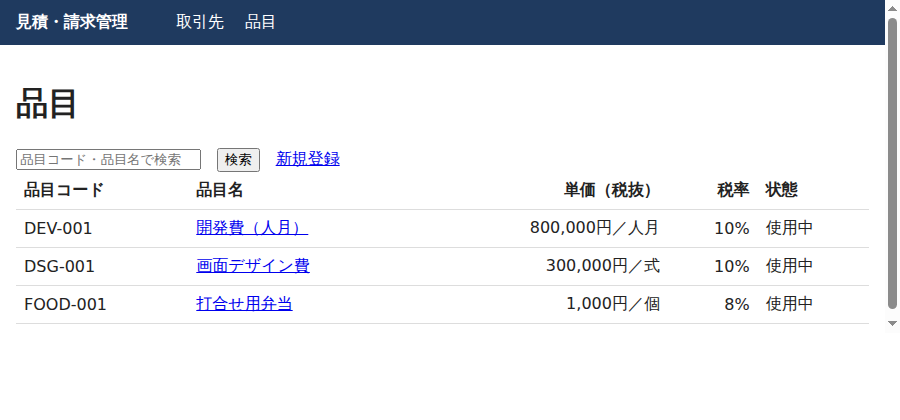
※Linuxの開発環境で撮影したため、お使いのOSやブラウザとは見た目が異なる場合があります。
つまずきやすい点
bin/rails db:seedを何度も実行して重複する:サンプルではfind_or_create_by!を使い、何度実行しても増えないようにしています- 郵便番号をハイフンあり・なしで混在させる:この回は両方を許可しています。帳票に印字する回で表記を統一する方針を決めます
- マスタを削除すると、過去の見積が困る:今は削除できますが、見積書が品目を参照するようになる第3回以降は、削除ではなく「使用中」を外して停止する運用に切り替えます
- ログインがない:この回では誰でも画面を開けます。第2回でログインを付けるまでは、公開サーバーに置かないでください
発注者向けメモ:マスタ管理を頼むときの確認点
マスタ画面は「地味だが後から効く」部分です。開発会社に依頼するときは、次の点を確認しておくと安心です。
- ☐ 品目コード・取引先コードの採番ルール(今のExcelの番号を引き継ぐか)を伝えたか
- ☐ 重複や入力ミスを防ぐルール(必須項目・桁数・形式)を、開発会社と一覧にして合意したか
- ☐ 既存のExcelからのデータ移行(件数・表記ゆれの整理を誰が担当するか)が見積に入っているか
- ☐ マスタを「削除」ではなく「停止」にする運用の要否を決めたか
- ☐ 税率が改正されたときの変更方法(設定画面か、開発会社への依頼か)を確認したか
- ☐ 操作した人・日時の記録(誰が品目の単価を変えたか)が必要か
工数が増えやすいのは、既存データの移行と、取引先ごとの特別な単価・締め日などの例外ルールです。例外が多い場合は、最初のリリースでは標準ルールだけで始めて、後から追加する進め方も検討できます。
「Excelの名簿をそのまま取り込むと、全角半角の違いや表記ゆれで重複が出ます。移行前の整理に、思った以上の時間がかかることが多いです」
まとめと次回予告
第1回では、scaffoldで取引先・品目のマスタを作り、バリデーション・日本語化・テストで「入口のルール」を固めました。Railsの標準機能だけで、外部ライブラリなしにここまで作れます。なお、この環境ではブラウザ上での登録操作(フォーム送信)の画面確認は一覧画面のみで、登録・エラー表示は自動テストで確認しました。
次回の第2回は「ログインを付ける」です。Rails 8標準の認証ジェネレータを使い、権限の種類まで整理します。
この連載の記事一覧
この記事は連載「Railsで作る見積・請求管理システム」の1回です。連載のほかの回は次のとおりです(連載の一覧ページ)。
- 【Railsで作る見積・請求管理システム 第0回】Rails 8の雛形を動かして、Excel見積からの脱却を始める
- 【Railsで作る見積・請求管理システム 第1回】取引先と品目のマスタを作る(scaffoldと入力チェック)(この記事)
- 【Railsで作る見積・請求管理システム 第2回】ログインを付ける(Rails 8標準の認証と権限の分け方)
- 【Railsで作る見積・請求管理システム 第3回】見積書と明細を作る(Hotwireで明細行をその場で追加)
- 【Railsで作る見積・請求管理システム 第4回】金額・消費税・端数処理を正しく計算する(税率ごとに1回だけ丸める)
- 【Railsで作る見積・請求管理システム 第5回】見積書をPDFで出力する(Prawnで日本語フォントを扱う)
- 【Railsで作る見積・請求管理システム 第6回】見積書をメールで送る(Solid Queueで送信を非同期にする)
- 【Railsで作る見積・請求管理システム 第7回】受注から請求書へ変換する(状態遷移と請求番号、インボイスの記載事項)
- 【Railsで作る見積・請求管理システム 第8回】入金管理と督促の一覧を作る(一部入金・期限超過の抽出)
- 【Railsで作る見積・請求管理システム 第9回】Kamalでサーバーに配備する(Dockerイメージ・SSL・秘密情報・運用の注意)





コメント
コメント一覧 (3件)
[…] 【Railsで作る見積・請求管理システム 第1回】取引先と品目のマスタを作る… […]
[…] 【Railsで作る見積・請求管理システム 第1回】取引先と品目のマスタを作る… […]
[…] 【Railsで作る見積・請求管理システム 第1回】取引先と品目のマスタを作る… […]